Wedding Photos From Guests: How to Collect Photos & Videos in One Place
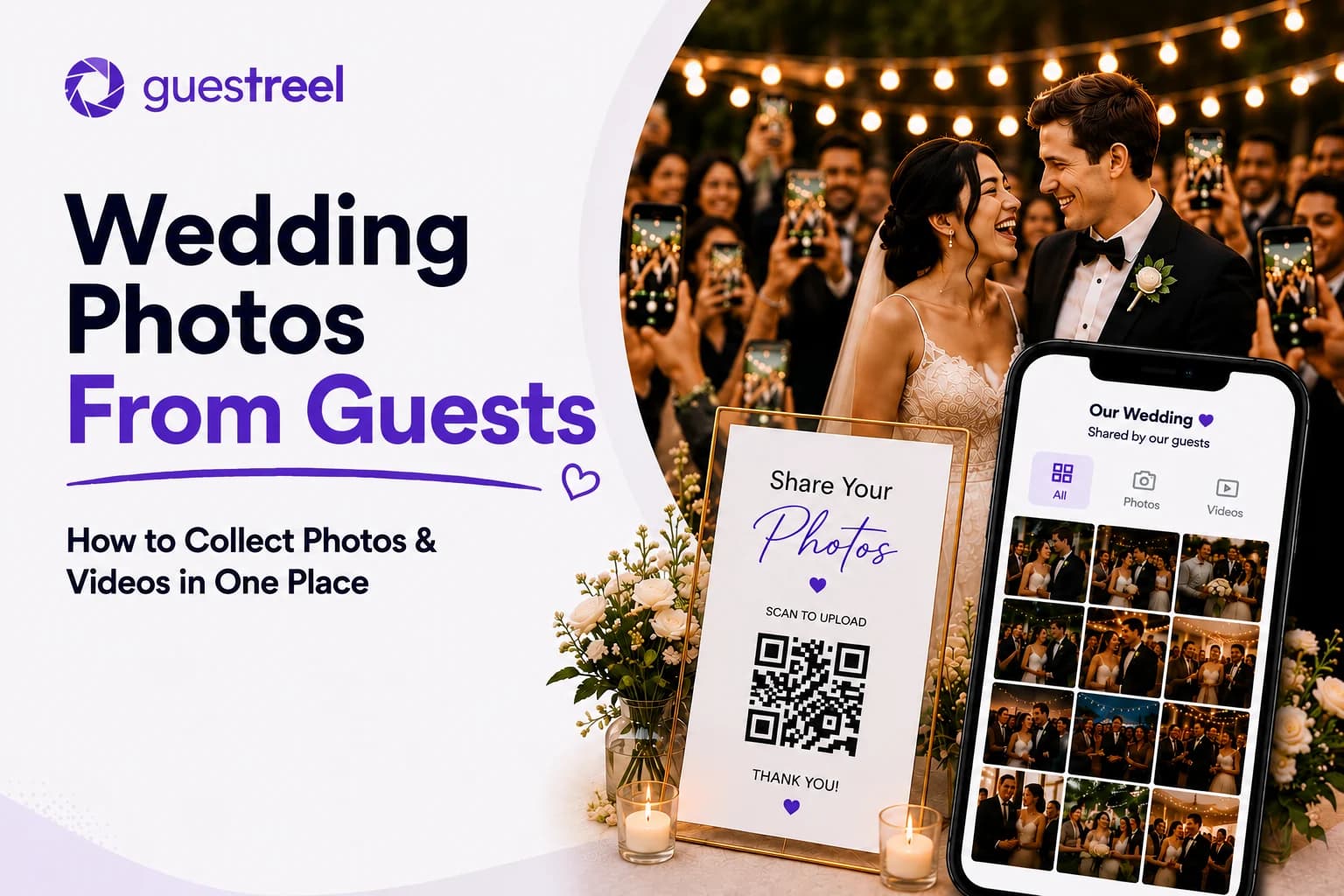
Your guests will capture parts of your wedding you never see: reactions across the room, candid conversations, dance-floor moments, selfies, behind-the-scenes clips and small interactions happening while you are somewhere else.
The challenge is getting those photos and videos off their phones and into one place.
For most weddings, the simplest approach is to choose one primary upload destination and give guests several easy ways to reach it. A QR code linked to a mobile-friendly upload page can reduce friction because guests can scan, choose their photos or videos and upload without having to remember where to send them later.
Other options, including Google Photos, cloud folders, Apple Shared Albums, messaging apps and wedding hashtags, can also work. The right choice depends on your guest list, image-quality requirements, privacy preferences, budget and venue connectivity.
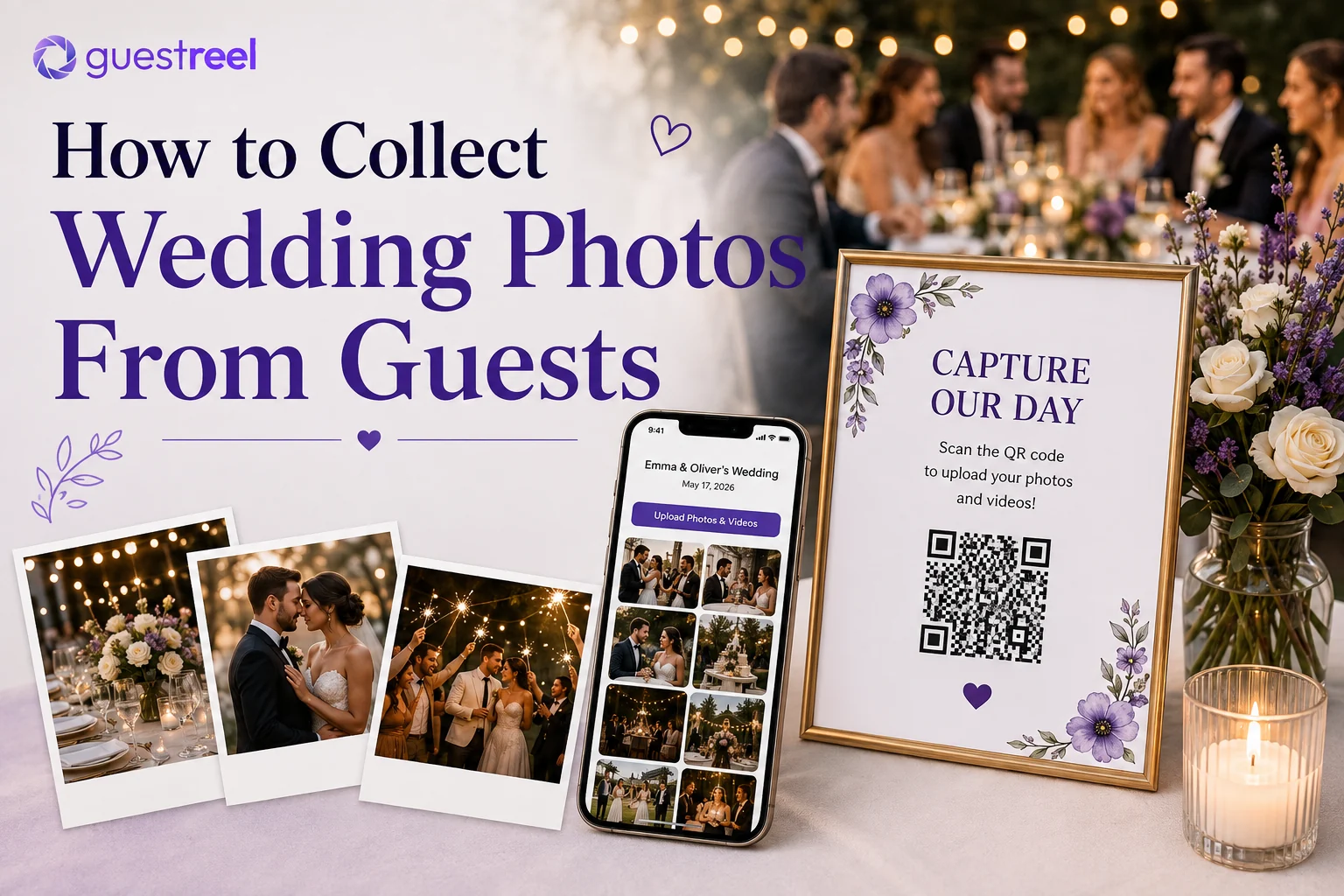
What Is the Best Way to Collect Wedding Photos From Guests?
There is no single method that suits every wedding. The best choice is the one your guests are likely to use and that gives you the quality, privacy and organization you want afterwards.
| Method | Guest effort | Photo quality | Privacy | Best for |
|---|---|---|---|---|
| QR code photo-sharing platform | Low | Depends on platform | Usually configurable | Keeping uploads in one dedicated wedding gallery |
| Google Photos | Medium | Depends on upload settings | Configurable sharing controls | Groups comfortable with Google Photos |
| Google Drive or Dropbox | Medium | Can preserve original files | Folder and link permissions | Couples focused on file storage |
| Apple Shared Albums | Medium | Reduced from original | Invite or public-link controls | Apple-heavy groups where maximum resolution is not essential |
| WhatsApp or messaging | Low | Depends on how files are sent | Limited to the conversation | Small groups and informal sharing |
| Wedding hashtag | Low | Social-media versions | Usually public or account-dependent | Social discovery and public guest posts |
| Email or AirDrop | Medium to high | Can preserve originals | Direct sharing | Collecting from a small number of people |
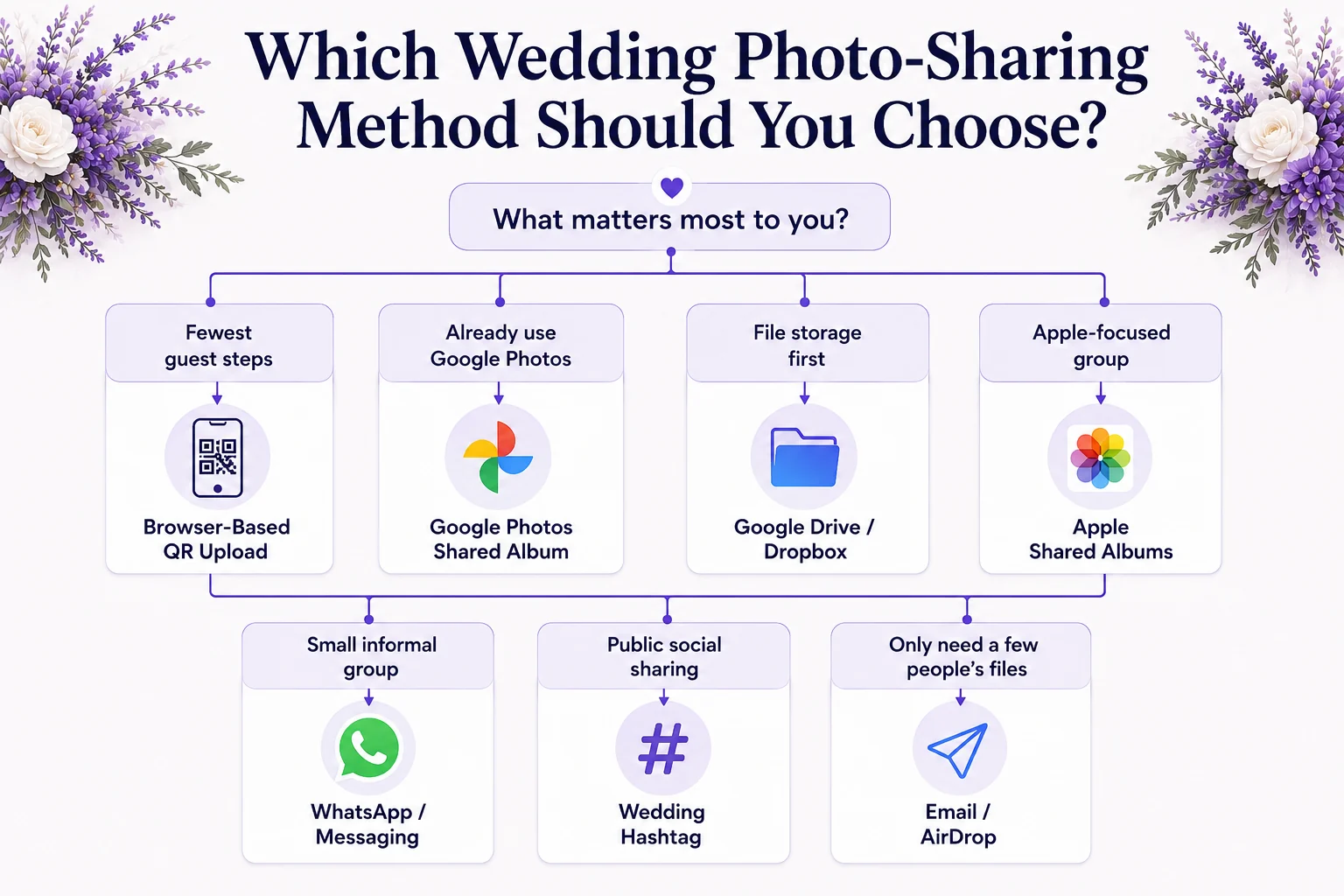
Choose based on your priority:
- Want fewer guest steps? Prioritize a browser-based upload process that does not require a mandatory app or account.
- Want original files? Check how the specific platform handles uploaded media rather than assuming every shared album preserves originals.
- Want social sharing? A wedding hashtag can complement your collection method, but it is not the same as receiving the original files.
- Have an Apple-heavy guest list? Apple Shared Albums may be convenient if reduced resolution is acceptable.
- Expect unreliable venue internet? Use a destination guests can return to after the wedding and provide a direct link as well as a QR code.
The most important principle is simple:
One destination. Multiple touchpoints.
Choose where you want the actual photos and videos to end up, then make that same destination easy to find throughout the celebration.
Platform features and sharing limits referenced in this guide were checked in August 2026. Services can change, so verify current settings and limits before your wedding.
Why Collect Wedding Photos From Guests?
Guest photos should complement professional wedding photography, not replace it.
Your photographer is intentionally documenting the important parts of the day and creating polished, consistent images. Your guests are spread across the venue and naturally photograph the people and moments happening around them.
That can give you photos and videos of:
- reactions at tables;
- informal moments during cocktail hour;
- selfies with friends and relatives;
- getting-ready moments;
- conversations away from the main action;
- dance-floor clips;
- decorations and details;
- moments your photographer was not nearby to see.
Guest photos give you a different perspective on the same day.
You can still have an unplugged ceremony
Collecting guest photos does not mean asking everyone to use their phones during your vows.
If you want an unplugged ceremony, keep it unplugged. Guests can still contribute photos from getting ready, cocktail hour, dinner, speeches, the reception and the following morning.
Think of guest photo sharing as a wedding-wide collection system, not something that needs to operate during every part of the day.
If you are still organizing the rest of your preparations, add photo sharing, signage and venue connectivity to your wedding planning checklist.
7 Ways to Collect Wedding Photos From Guests
The main differences between collection methods are not just price. Consider how many steps guests must complete, whether they need an account, what happens to image quality, who can access the files and how much organization you will need afterwards.
1. Use a QR Code for Wedding Photos
A wedding photo QR code sends guests directly to the place where you want them to upload.
The process is usually:
- Create your wedding gallery or upload destination.
- Generate or connect a QR code.
- Add the QR code to signs or wedding materials.
- Guests scan it with their phones.
- They choose their photos or videos and upload them.
- The files appear in your chosen destination.
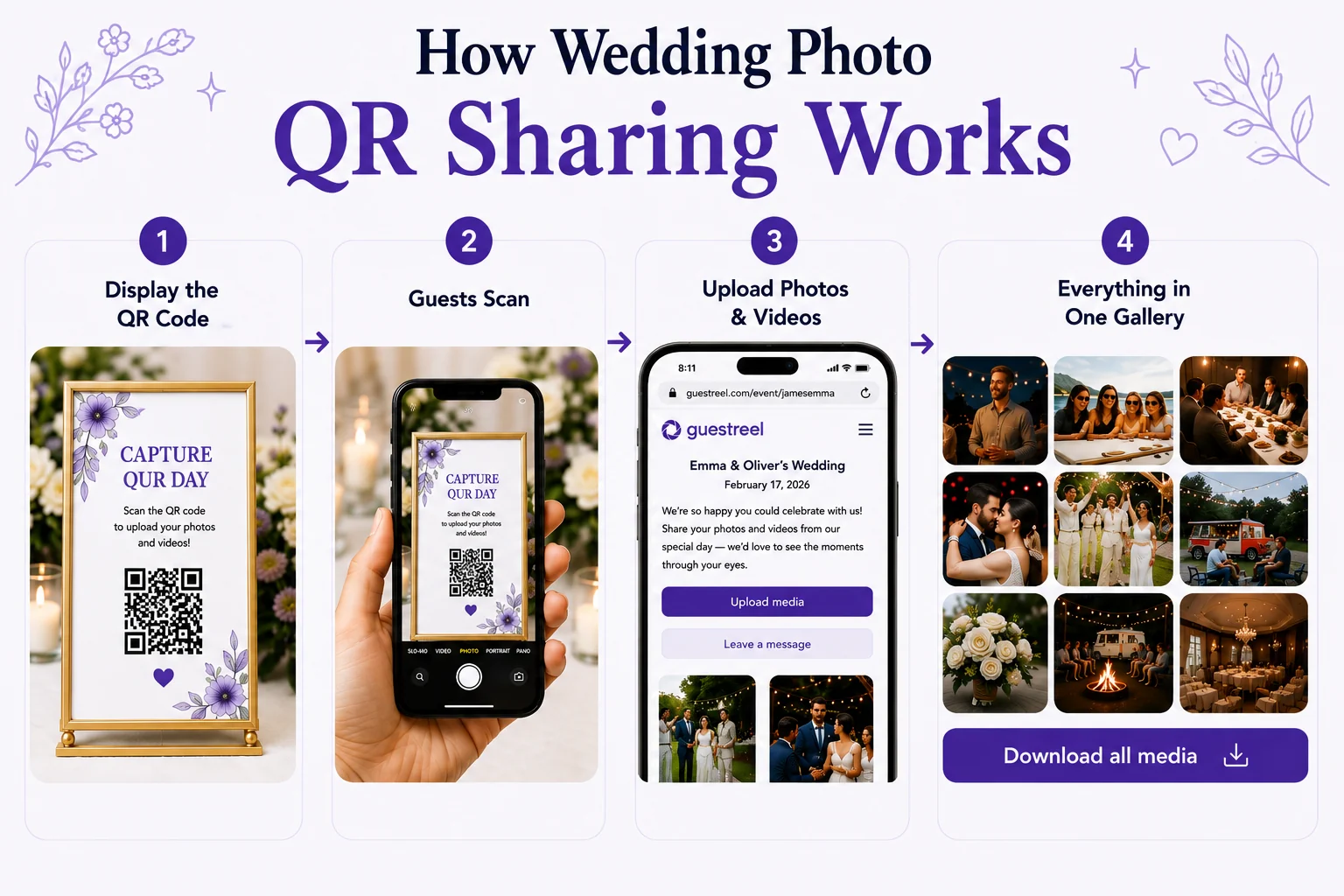
The QR code itself does not store any photos. It is simply a shortcut to the gallery, album or upload page.
A dedicated wedding photo-sharing platform can be useful when you want a purpose-built upload experience rather than adapting a general cloud service.
Best for: Couples who want one dedicated destination and minimal instructions for guests.
Consider: Uploading still requires an internet connection. Test venue Wi-Fi and mobile reception before relying on real-time uploads.
2. Create a Google Photos Shared Album
Google Photos can work well if you and many of your guests already use it.
Google allows album owners to share albums with specific people or through a link and to control whether other people can collaborate by adding photos. Google also notes that shared links can be forwarded, so access settings should match the level of privacy you want.
Review Google's current shared album controls before setting up your wedding album.
Best for: Couples already comfortable with Google Photos and its sharing permissions.
Consider: Test the contribution process from someone else's phone. Viewing an album and contributing to one are different actions, and the guest experience should be clear before you print any instructions.
3. Use Google Drive or Dropbox
A cloud folder works well when your main goal is receiving files rather than creating a wedding-style gallery.
You can keep uploads together in a folder and organize them later. Depending on the service and upload method, cloud storage can also be useful when preserving source files is important.
The trade-off is that these tools are primarily designed for file management rather than wedding participation. Folder permissions and upload instructions can therefore require more attention.
Best for: Couples comfortable with folders, links and access permissions who care more about collecting files than creating an event experience.
Consider: Test permissions while signed out of your own account. A folder that works perfectly for you may behave differently for a guest.
4. Use Apple Shared Albums
Apple Shared Albums can be convenient for groups that primarily use Apple devices, but they are not an original-quality archive.
Apple states that Shared Albums upload copies of your media. Standard photos are reduced to 2048 pixels on the long edge, while shared videos are delivered at up to 720p. Apple currently limits an individual Shared Album to 5,000 photos and videos.
You can review Apple's current Shared Albums limits before deciding whether those trade-offs matter for your wedding.
Best for: Apple-focused groups that prioritize convenient shared viewing over preserving every file at its original resolution.
Consider: Choose another method if you want to archive the highest-quality source files guests captured.
5. Collect Photos Through WhatsApp or Group Messaging
Messaging apps are familiar, which reduces the learning curve.
The challenge appears afterwards. Photos and videos may arrive:
- in different conversations;
- from individual guests;
- inside several group chats;
- mixed with messages;
- at different times over several days.
You then need to find, download and organize everything yourself.
Best for: Small weddings or couples who already have one active guest group and do not mind manual organization.
Consider: If image quality matters, check the app's current media and file-sharing options. Different ways of sending the same image can produce different results.
6. Create a Wedding Hashtag
A wedding hashtag gives guests a shared phrase to use when posting on social media. It can be fun for discovering public posts during and after the wedding.
But a hashtag is a discovery tool, not a complete file-collection system.
It can miss:
- people who do not post;
- guests with private accounts;
- photos that remain in camera rolls;
- original versions of images and videos.
Best for: Couples who want a social layer around the wedding and enjoy seeing public guest posts.
Consider: If your priority is collecting original files in one place, use the hashtag alongside a primary upload destination rather than instead of one.
7. Ask for Photos by Email or AirDrop
Direct transfer can work when you only need photos from a few people.
AirDrop is useful when compatible devices are physically close. Email can handle later follow-up. Neither approach scales particularly well when dozens of guests are contributing.
You also return to the same organizational problem: media arrives person by person rather than in one shared destination.
Best for: Getting a specific set of photos from close friends or relatives.
What about disposable cameras and photo booths?
Disposable cameras and photo booths solve a slightly different problem: they create additional photographs rather than collecting the photos already on guests' phones.
They can still complement your main sharing method if you want another guest activity or a deliberately different visual style.
If that sounds useful, explore these wedding photo booth ideas.
How to Set Up Wedding Guest Photo Collection
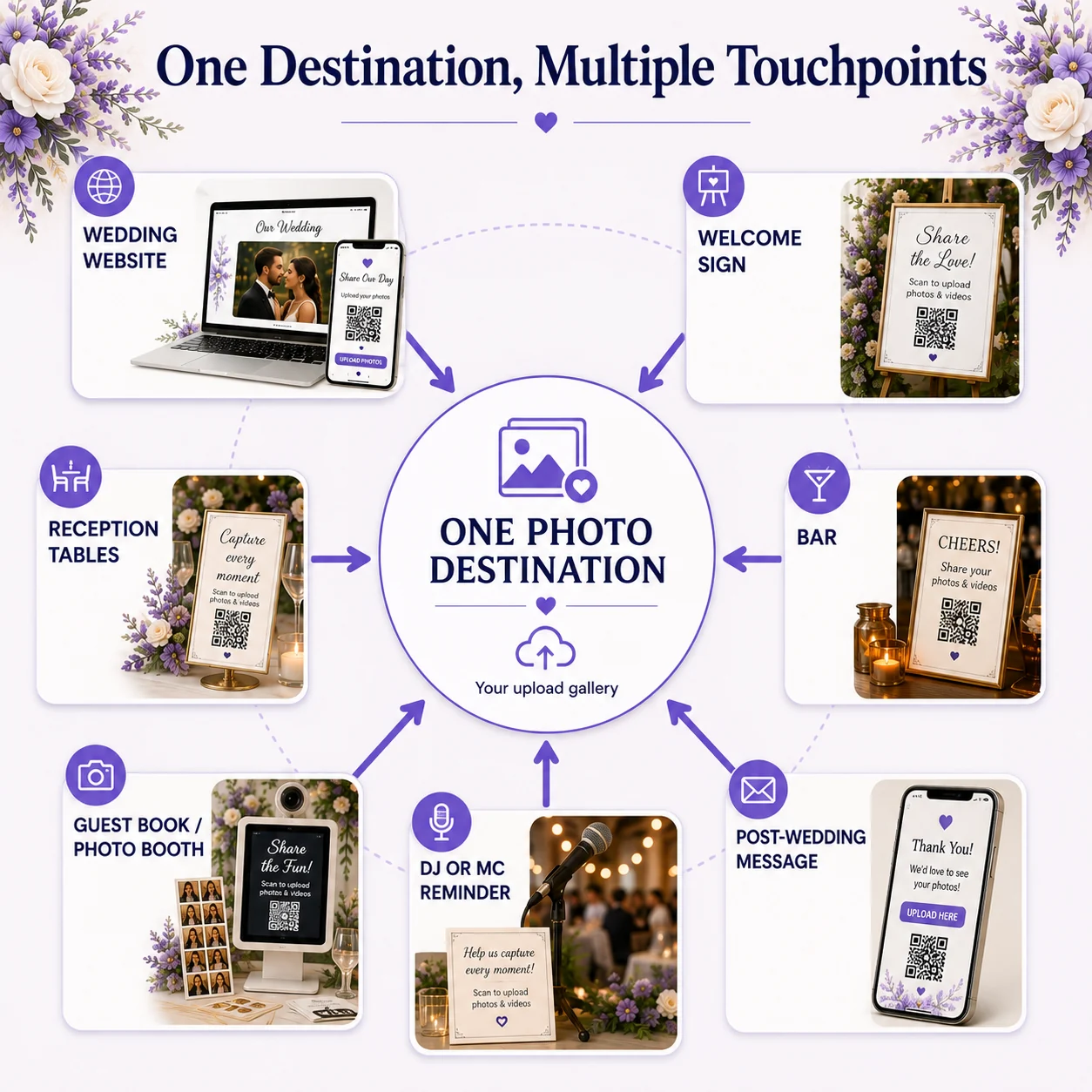
Once you choose a method, the setup should be designed around the guest experience rather than the technology.
1. Choose one primary destination
Decide where you want the actual files to live.
Check:
- whether guests can upload photos and videos;
- whether an app or account is required;
- how the platform handles image quality;
- who can access the collection;
- storage or upload limits;
- how long the event or collection remains available;
- how you will download the files afterwards.
Avoid giving guests several equal options unless you have a specific reason to do so. A QR gallery, WhatsApp group, separate cloud folder and hashtag can quickly recreate the scattered-photo problem you were trying to solve.
2. Configure access before sharing anything
Set your permissions and then test them from outside your own account.
If guests are meant to upload, confirm that they can. If they should also be able to view other uploads, test that experience separately.
The best test is whether someone who has never seen the setup can use it without instructions from you.
3. Create a QR code and fallback link
QR codes are useful on physical wedding materials because guests do not need to type a URL.
Where possible, include a readable direct link as a backup. It gives guests another way to reach the collection if they want to return later or cannot scan the printed code.
4. Test the printed QR code
Do not stop after scanning it from your computer screen.
Print the design at the size you plan to use and test it:
- from a normal seated or standing distance;
- in lighting similar to the venue;
- on both iPhone and Android;
- from a phone that is not already logged into your accounts.
Keep strong contrast around the QR code and avoid placing it over busy backgrounds that make scanning harder.
5. Give someone else ownership on the day
You should not be troubleshooting upload instructions during your reception.
Tell your planner, coordinator, DJ, MC or a member of the wedding party how the system works and where the sharing information is displayed.
They do not need to become technical support. They just need enough context to point guests in the right direction.
How to Get More Guests to Upload Their Photos
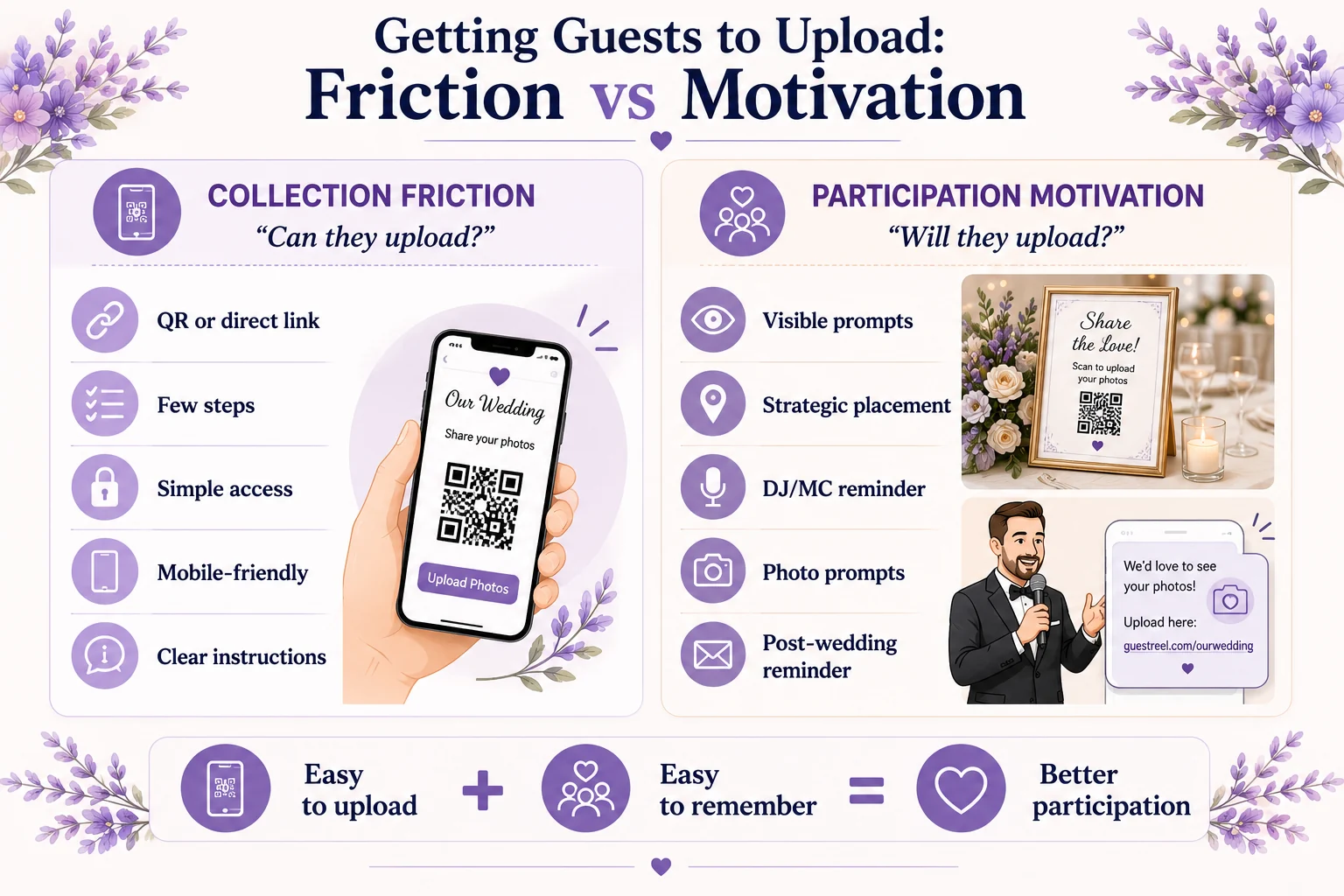
Getting more photos depends on solving two different problems:
- Collection friction: Can guests upload without unnecessary steps?
- Participation motivation: Will they notice the request, remember it and choose to contribute?
A technically simple system can still underperform if nobody sees it. Great signage will not fix a frustrating upload process.
Reduce the number of steps
Ask guests to do as little as possible.
If the process requires several accounts, downloads, permission screens or unclear instructions, some guests will abandon it.
Test the workflow with someone less familiar with technology than you are. Their questions will often reveal friction you no longer notice.
Keep the instructions short
Guests do not need an explanation of the technology.
A sign might say:
Share your photos with us
- Scan the QR code
- Choose your photos and videos
- Upload
Adapt those steps to your actual collection method.
Ask your DJ or MC for one brief reminder
A short announcement after dinner or before dancing can reach people who missed the signs.
Keep it natural. Tell guests what you would love them to share and where they can find the upload information.
Give guests a little inspiration
Simple photo prompts can encourage more varied contributions:
- Best table selfie
- Funniest dance-floor moment
- Best reaction during the speeches
- A moment we might have missed
- Your favorite photo of the night
The goal is not to turn the reception into a photography assignment. Prompts simply remind guests that the candid things happening around them are worth sharing too.
Follow up once after the wedding
Some guests will intend to upload and forget.
Send one friendly reminder using the same destination rather than creating a new album or asking people to send photos through several different channels.
Where Should You Put Your Wedding Photo QR Code?
A wedding photo QR code works best where guests have both time to notice it and a reason to use their phones.
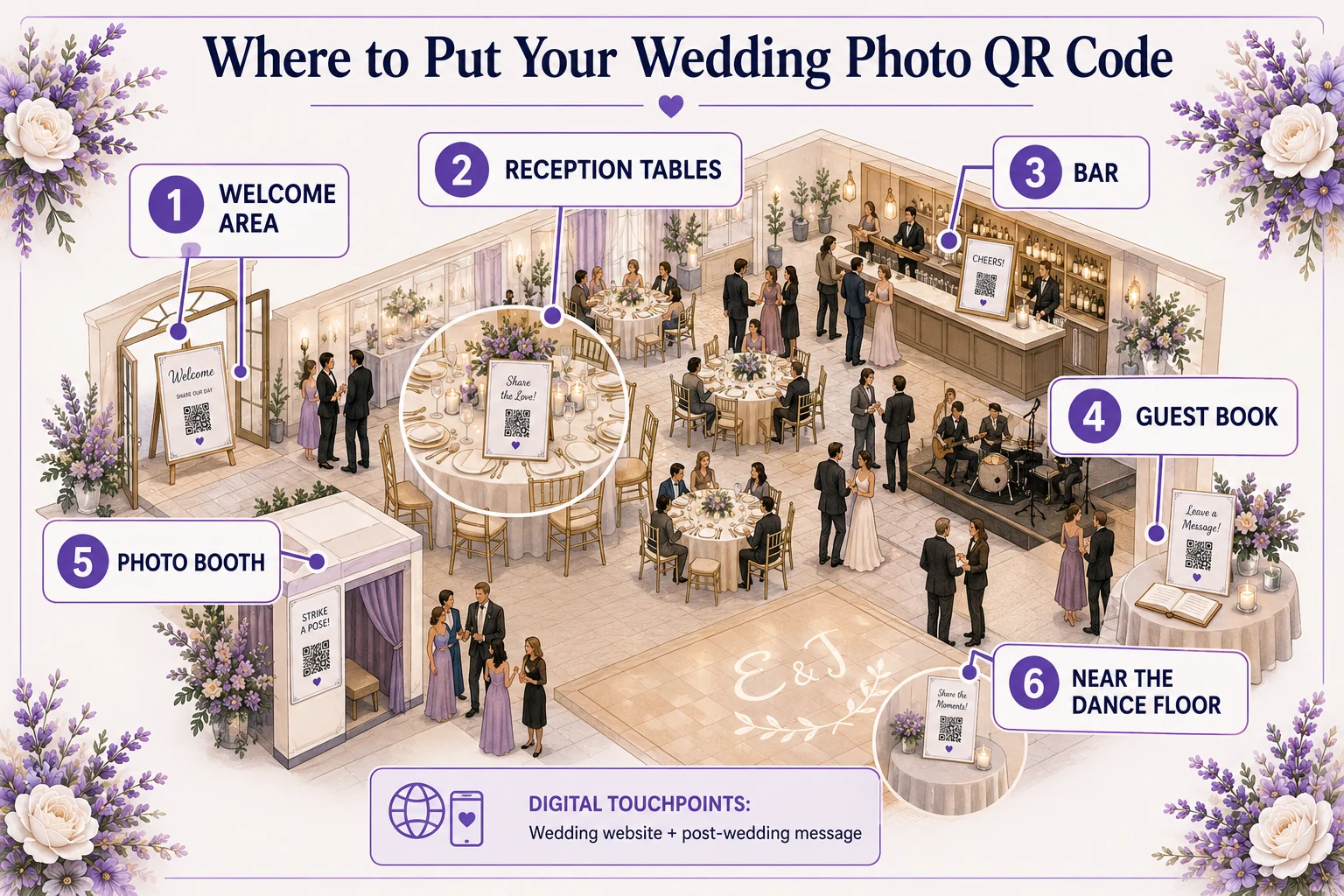
Useful placements include:
- Welcome area — Introduces photo sharing as guests arrive without interrupting the ceremony.
- Reception tables — Guests spend significant time seated, giving them multiple opportunities to notice the code.
- Bar — People naturally pause while waiting for a drink.
- Guest book table — Photo sharing fits naturally alongside another guest participation activity.
- Photo booth area — Guests are already thinking about taking and sharing pictures.
- Wedding website — Gives guests a digital route to the collection before and after the event.
- Post-wedding message — Helps recover photos still sitting in camera rolls the following day.
You do not need a different QR code for each location. Several placements can all point to the same upload destination.
Avoid relying on one tiny sign in a low-traffic corner. If you are having an unplugged ceremony, keep photo-sharing prompts out of the ceremony focal area and emphasize them during the reception instead.
What If Your Wedding Venue Has Poor Wi-Fi or Mobile Signal?
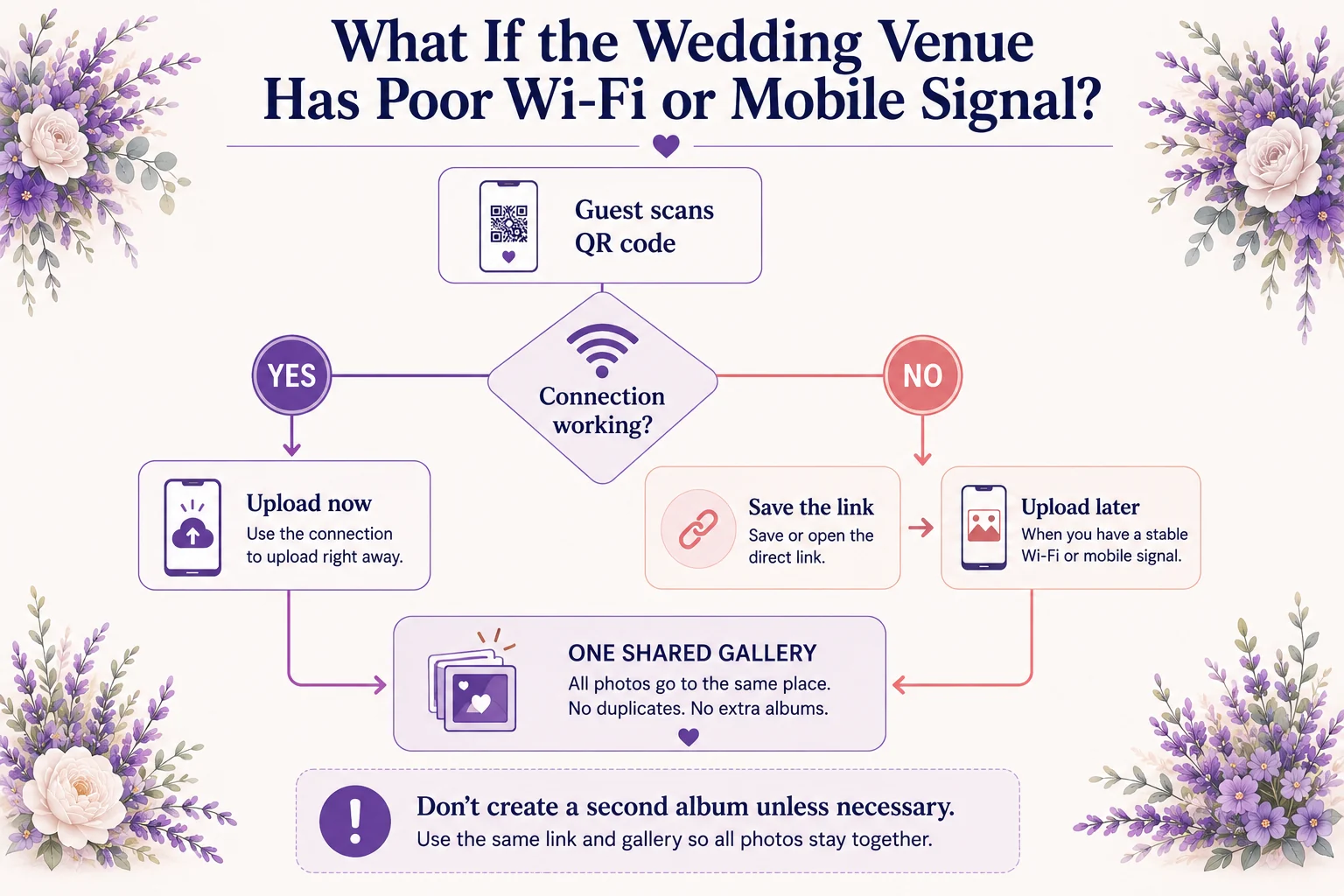
A weak connection does not mean you need a completely different photo-sharing plan.
Build the possibility into your setup:
- Test the venue connection before the wedding. Check both guest Wi-Fi and normal mobile reception in the areas where people will actually spend time.
- Provide a direct link as well as the QR code. Guests can return to it later.
- Keep the upload destination available after the event. Confirm the exact availability period for your chosen service or plan.
- Send the same link after the wedding. Guests can upload once they are back on a stable connection.
- Avoid creating a second collection unless necessary. Multiple destinations make the final archive harder to organize.
A QR code does not require guests to take and upload the photograph at the same moment. If your chosen platform supports later uploads, guests can contribute existing photos once they have a reliable connection.
Venue connectivity is worth checking alongside other practical details during your wedding venue planning.
Wedding Photo Sharing, Privacy and Image Quality
Privacy and file quality are easy to overlook when the first priority is getting guests to participate.
Decide what matters before you choose the platform.
Decide who should have access
Ask:
- Who can open the collection?
- Who can upload?
- Can guests see other people's uploads?
- Can the sharing link be forwarded?
- Can access be changed later?
A private collection gives you more control than relying entirely on public social media, but "private" can mean different things on different platforms.
For example, Google Photos lets album owners manage collaboration and link sharing, but Google notes that someone with access to a shared link can forward it to others. Check the current settings for the service you use rather than assuming all private galleries work alike.
Verify what happens to the files
If you want guest photos for printing, archiving or editing, preserve the highest-quality source files available.
Do not assume every "shared album" stores originals. Apple Shared Albums, for example, reduce standard photo dimensions and video resolution.
If a service advertises original-quality or uncompressed uploads, confirm that claim in its current product documentation before relying on it.
Treat private collection and public posting separately
A photo uploaded privately for the couple is not automatically something the guest expected to appear publicly.
Before posting candid or sensitive photos of other people on social media, consider whether those pictured would reasonably expect the image to be shared publicly.
What to Do With Guest Photos After the Wedding
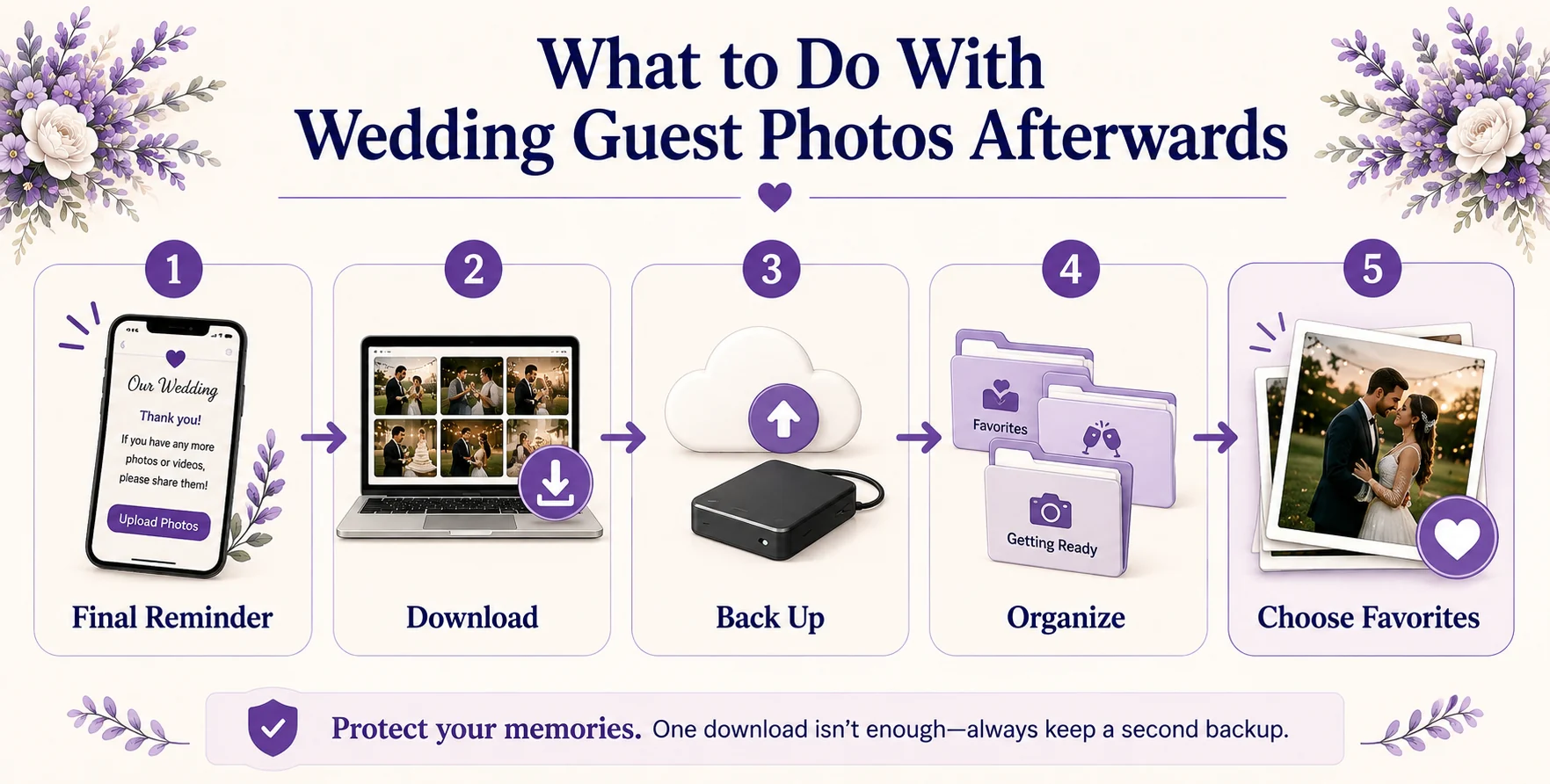
Once uploads have slowed down, turn the collection into something you can keep.
Download the files
Do not rely on one online gallery as your only permanent copy.
Download your photos and videos once the main upload period is over.
Create another backup
Keep at least one additional copy somewhere separate from the first, such as another cloud-storage service or an external drive.
Organize only as much as you need
You do not have to perfectly catalogue hundreds of candid photos immediately.
Start with broad groups such as:
- getting ready;
- ceremony;
- cocktail hour;
- dinner and speeches;
- reception;
- dance floor;
- next-day photos.
Favorite the images you particularly want to print, share or add to an album.
Professional photographs and guest photos can remain separate if that makes organization easier. You can always combine favorites later.
Run one final five-point check
Before you consider the collection finished, confirm that:
- the main upload link is still working;
- you have sent any final guest reminder;
- the files have been downloaded;
- at least one separate backup exists;
- you understand which photos are private and which you are comfortable sharing publicly.
How Guestreel Handles Wedding Guest Photo Sharing
For couples who prefer a dedicated wedding photo-sharing platform, Guestreel is designed around a QR-based browser upload process rather than a general-purpose shared folder.
Couples create an event page and personalized QR code. Guests scan the code and upload photos and videos through their browser, with no app download or guest account required. Guestreel also supports original-quality uploads, a private event gallery, event-page customization, Canva templates for QR signage and one-click downloading of collected media.
You can see how the process works on the Guestreel wedding photo-sharing page or compare the current Guestreel plans.
Whichever platform you choose, the underlying strategy remains the same: create one clear destination, remove unnecessary guest steps and make that destination visible at several points throughout the celebration.
Frequently Asked Questions
Can guests upload wedding photos after the wedding?
Yes, if your chosen collection remains available after the event. Keeping the same upload link active gives guests time to contribute photos once they are home, particularly if venue connectivity was poor or they forgot during the reception. Check your platform's event-duration or access limits in advance.
Can guests upload wedding videos as well as photos?
It depends on the platform. Check whether video uploads are supported and whether there are limits on file size, storage or video length. If videos matter to you, test the upload process with a real video file before the wedding rather than assuming photo and video handling are identical.
Can I print my wedding photo QR code on signs and invitations?
Yes. A wedding photo QR code can be printed on welcome signs, reception cards, table stationery or other wedding materials as long as it remains large and clear enough to scan. Test the final printed design before producing multiple copies, particularly if the code sits on a textured or decorative background.
How long should I leave wedding photo uploads open?
Leave enough time for guests who do not upload during the celebration to contribute afterwards. The practical window will depend on your chosen service and how long the event or gallery remains active. Tell guests when you plan to stop collecting if there is a genuine deadline.
Should I use both a wedding hashtag and a photo QR code?
You can, but give them different jobs. Use the QR code or primary upload link for collecting the actual photos and videos you want to keep. Use the wedding hashtag as an optional social feature for public posts. Avoid presenting both as competing places guests need to send the same files.
Do guests need an account to upload wedding photos?
That depends on the collection method. Some services require guests to sign in or already use a particular platform, while dedicated browser-based tools may allow uploading without an account. Check the workflow from a signed-out device before choosing, especially if minimizing guest friction is important.
Keep the Collection Simple
You do not need the most complicated photo-sharing setup to collect meaningful wedding memories.
Choose one place for the photos and videos to end up. Test the process from a guest's perspective. Then give people several natural opportunities to find that same upload route during and after the celebration.
The easier the system is to understand, the less time you will spend tracking down files later and the more likely you are to end up with the candid moments everyone else saw while you were busy living the day.