The best digital wedding guestbook apps help you collect personal messages, marriage wishes, and memories from the people celebrating with you. But choosing the right one involves more than finding an app with a QR code.
The real differences are how guests leave messages, whether they need an account, how much you can customize the guestbook, and what you get to keep afterward.
Some platforms offer personalized written notes and printable keepsakes. Others combine guestbook messages with wedding photo galleries, live displays, or broader wedding planning tools.
Quick picks:
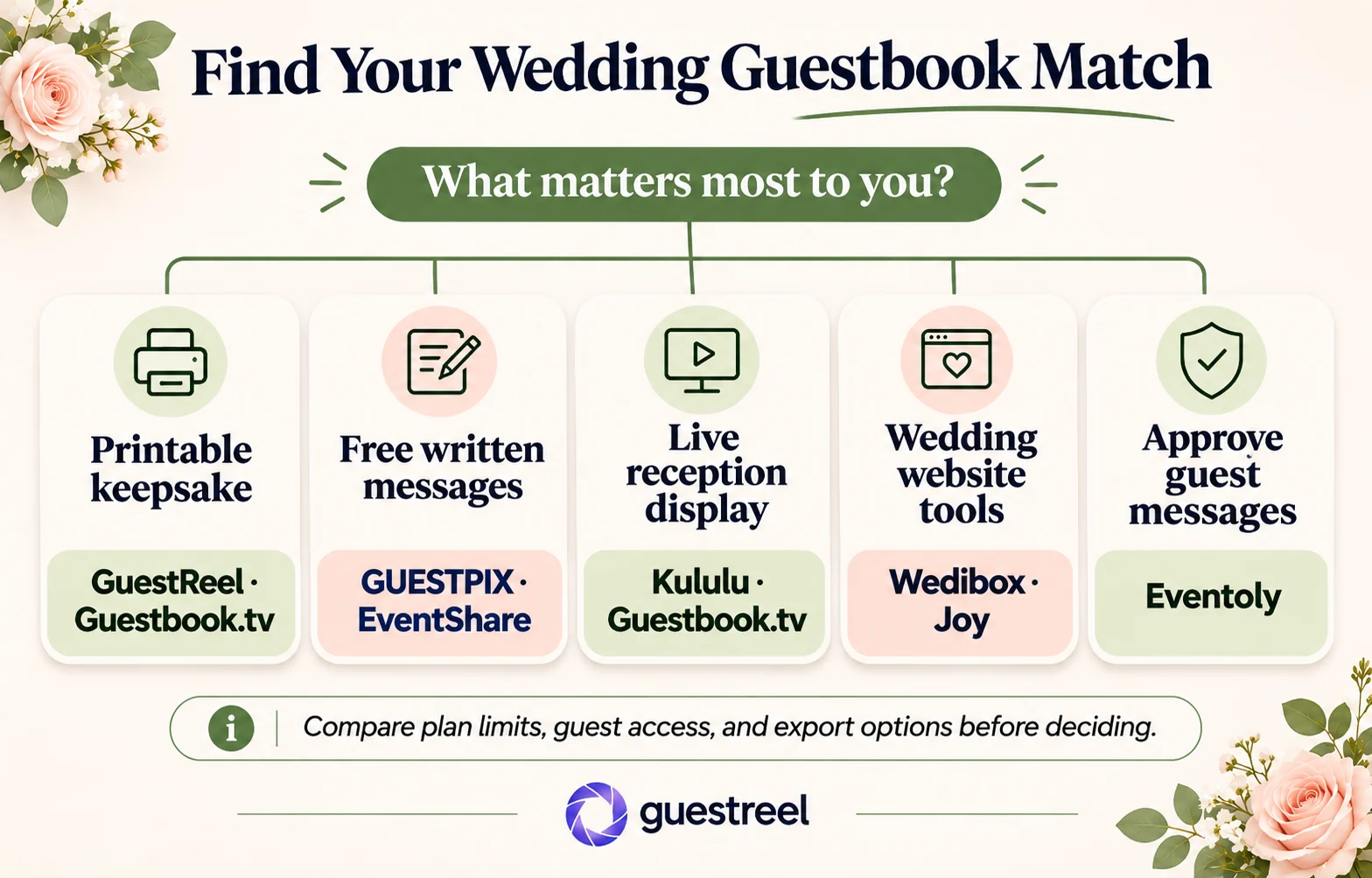
- Guestreel: Best for personalized written notes and printable PDF keepsakes.
- GUESTPIX: Best for free written wishes alongside wedding photos.
- Wedibox: Best for guided messages and wedding website integration.
- Kululu: Best for decorated messages and live reception displays.
- EventShare: Best for free written messages and customizable event galleries.
- Guestbook.tv: Best for printable guestbooks and interactive displays.
- Eventoly: Best for written messages with approval controls.
- Joy (WithJoy): Best for couples already using Joy's wedding website and mobile app.
There is no universal winner. The right choice depends on how you want your guests to participate and whether you prefer a printed book, downloadable message collection, or online gallery.
This guide compares eight digital wedding guestbook apps, explains the trade-offs, and shows you how to set up a guestbook your guests can easily use.
Best Digital Wedding Guestbook Apps at a Glance
| App | Best for | Guest access | Starting option |
|---|---|---|---|
| Guestreel | Personalized notes and PDF keepsakes | Browser; no guest account | Free trial; $39 paid |
| GUESTPIX | Free written wishes | Browser; no guest account | Free |
| Wedibox | Writing prompts and wedding website tools | Browser; no app required | $49 Wedding plan |
| Kululu | Decorated messages and live displays | Browser; no registration | Free and paid plans |
| EventShare | Written messages and event galleries | Browser; no app required | Free; $47 paid |
| Guestbook.tv | Printable keepsakes and live displays | Browser; QR code or link | Free; $29 Silver |
| Eventoly | Guestbook moderation | Browser; no app required | Free trial; $59 Standard |
| Joy (WithJoy) | Existing Joy wedding website users | Mobile app and account | Free core app |
Product details and US-market pricing were reviewed using official provider information on November 5, 2026. Prices, promotions, features, and limits can change.
How We Compared Digital Wedding Guestbook Apps
Guestreel publishes this guide and is included in the comparison. To keep it useful, we applied the same questions to every platform:
- Written messages: Can guests leave a standalone note without uploading a photograph?
- Guest experience: Does signing require an app, account, or complicated setup?
- Customization: Can couples personalize the guestbook or offer message prompts?
- Privacy: Can hosts control who sees messages or moderate contributions?
- Keepsakes: Can the finished guestbook be printed, downloaded, or exported?
- Pricing and limits: Which plans include written messages, and how long can guests contribute?
We checked features against official product pages, pricing information, and help documentation rather than relying on other app comparison articles.
We did not conduct identical hands-on usability tests across all eight platforms. The recommendations therefore reflect documented capabilities and editorial suitability, not measured performance rankings.
What Counts as a Digital Wedding Guestbook?
A digital wedding guestbook is an online collection of written messages, wishes, advice, and memories from wedding guests.
Instead of signing a physical book, guests use a QR code, website link, or mobile app to contribute.
For this comparison, we focused on platforms that document standalone written messages. This matters because a guest who wants to leave a heartfelt note shouldn't necessarily have to upload a photograph first.
A platform that only allows captions on photo uploads serves a different purpose.
If you're still choosing between different guestbook styles, our wedding guest book ideas guide explores the broader options.
The 8 Best Digital Wedding Guestbook Apps
1. Guestreel
Best for: Couples who want personalized written notes, optional photos, and printable keepsakes without requiring guests to install an app.
Guestreel combines a digital guestbook with QR-code wedding photo and video sharing.
Guest experience: Guests scan the event QR code or open a link, select the Guestbook section, and leave a written message directly through their browser. No guest account or app download is required.
Written guestbook: Guests can write standalone notes, attach an optional photo, and personalize the appearance using different paper colors, patterns, and stickers.
The guestbook supports 10 paper colors, 10 patterns, and eight stickers. Guests can preview their notes before posting.
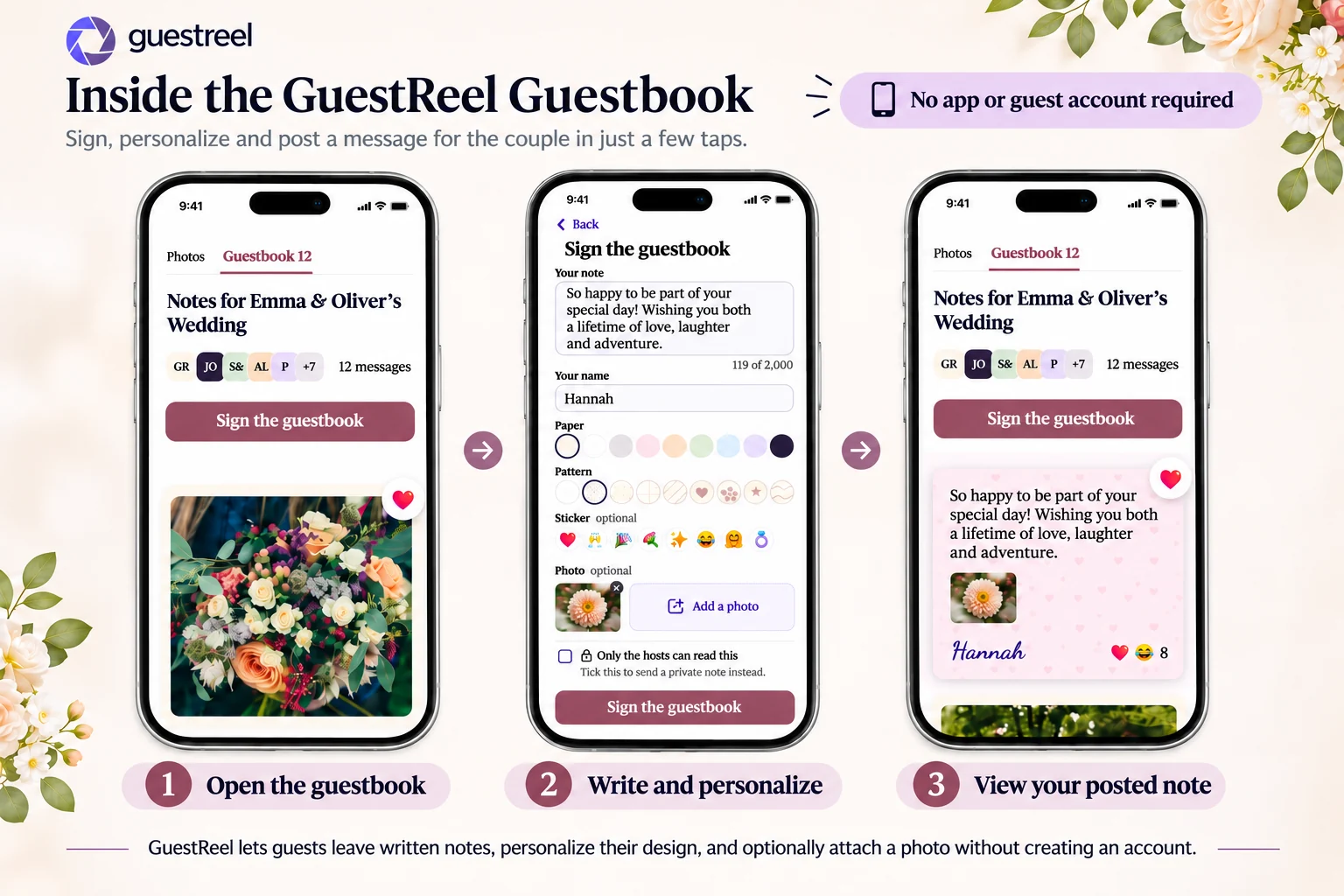
Privacy and host controls: Guests can choose to make a message visible only to the host. Couples can search, hide, or delete entries from their guestbook dashboard.
Keepsake options: Guestreel supports printable PDF guestbooks with a cover page, as well as CSV exports. Hosts can decide whether private notes appear in the printed version.
Pricing: The guestbook is included in all Guestreel plans. The seven-day free trial supports up to three guests and 10 media uploads. Premium costs $39 per event for up to 100 guests and 200 photo/video uploads, while Unlimited costs $69 with unlimited guests and uploads.
Main limitation: Guestreel has defined activity and storage periods rather than offering indefinite gallery hosting. Premium accepts contributions for 14 days after the event and retains photos for 30 days. Unlimited accepts contributions for 30 days after the event and retains photos for one year. Couples should confirm their guestbook access and download requirements against the current plan details.
Verdict: Guestreel makes sense when your priorities are written-message personalization, private notes, optional photos, and a PDF keepsake. Couples seeking a complete wedding planning suite with RSVPs, seating charts, and registry management may prefer a broader platform.
2. GUESTPIX
Best for: Couples who want a free written guestbook alongside wedding photo sharing.
GUESTPIX offers a private event gallery with written guestbook functionality.
Guest experience: Guests scan a QR code or open the event link to leave written wishes without downloading an app or creating an account.
Written guestbook: The platform supports standalone written messages. Guests can contribute from the wedding or remotely while the gallery is active.
Privacy and host controls: Couples can choose whether guestbook entries are visible to other guests or only to the host.
Keepsake options: GUESTPIX includes written messages as a CSV file inside the downloadable event ZIP archive. This preserves the messages but does not automatically create a designed, printable guestbook.
Pricing: The free plan includes unlimited written guestbook wishes, up to 50 photo uploads, and a 30-day contribution window. Paid packages expand gallery capacity, customization, and other functionality.
Main limitation: The free plan has a photo-upload limit and does not include video uploads. Couples who want to create a physical guestbook will also need to format the exported messages themselves.
Verdict: GUESTPIX is a practical choice when collecting written wishes for free matters more than receiving a ready-to-print book. It is particularly worth comparing if you also want a shared wedding photo gallery.
3. Wedibox
Best for: Couples who want writing prompts and guestbook functionality within a broader wedding website.
Wedibox combines wedding website tools, guest photo collection, and a written digital guestbook.
Guest experience: Guests open the wedding page through a browser and submit standalone written messages without downloading an app.
Written guestbook: Each note includes the guest's name and can contain up to 500 characters.
A particularly useful feature is the ability to customize message prompts. For example, couples might provide a sentence starter such as:
"One piece of marriage advice I'd love to share is..."
Prompts can help guests who aren't sure what to write.
Privacy and host controls: Written entries are collected in the host's guestbook dashboard, where couples can search and manage them.
Keepsake options: Wedibox allows couples to download written messages as a text file inside a ZIP archive.
Pricing: Written guestbook submissions are available on the $49 Wedding plan and $79 All-In-One plan. The free plan allows the feature to be configured, but guests cannot submit messages until the event is upgraded.
Main limitation: The 500-character maximum may feel restrictive for guests who want to write longer personal stories. The text export also requires additional design work if you want a printable book.
Verdict: Wedibox is worth considering when you want to combine a written guestbook with other wedding tools, especially if personalized writing prompts are important.
4. Kululu
Best for: Weddings where guest messages and photographs will be displayed during the reception.
Kululu combines guestbook messages with an interactive event album.
Guest experience: Guests join through a QR code or link without installing an app or registering.
Written guestbook: Kululu supports decorated text-only posts and captions accompanying photos or videos.
Guests can choose a decorative background for their written message, then contribute it to the shared event album.
Display and host tools: Kululu includes a live slideshow that can show contributions on a venue television or projector.
This allows guests' messages to become part of the reception experience rather than something the couple only reads afterward.
Keepsake options: Kululu documents bulk media downloads through ZIP archives. A dedicated printable PDF for standalone written guestbook entries is not clearly established in its public documentation.
Pricing: A free plan and paid Plus and Pro packages are available. Upload limits, event activity windows, storage periods, and moderation features vary by plan.
Main limitation: Lower-priced plans have shorter contribution or storage periods. The platform also emphasizes shared media and live presentation rather than providing a specifically designed printed message book.
Verdict: Kululu is most relevant when the guestbook is intended to be an interactive part of the wedding reception, particularly alongside a live photo wall.
5. EventShare
Best for: Couples who want free written messages alongside a customizable event gallery.
EventShare provides QR-code-based event sharing with a digital guestbook.
Guest experience: Guests open the wedding event page through their browser and submit messages without installing an app.
Written guestbook: Written messages are included across the free and paid plans. Guests can contribute remotely when the event link is active.
Customization and host tools: Couples can personalize the guest-facing page and collect guestbook contributions within the same event experience as their photos.
EventShare also supports live slideshow features.
Keepsake options: Public documentation confirms written-message collection but does not clearly specify a dedicated printable PDF guestbook or the exact written-message export format.
Pricing: EventShare currently offers Free, Plus (97) plans. Written guestbook messages are included in all three.
Main limitation: The free plan limits photo uploads to 20 and provides a two-week viewing and upload window. Paid plans extend access and increase media capacity.
Verdict: EventShare is a useful option for couples who want a free written guestbook with broader event-sharing functionality. Confirm the export process if printing messages is a priority.
6. Guestbook.tv
Best for: Couples who want to turn digital guest messages into a printable keepsake.
Guestbook.tv allows guests to share written messages and photographs through a QR code or event link.
Guest experience: Guests can submit text-only messages or notes with photographs using their browser.
Written guestbook: Messages collect in an online guestbook that can also be displayed during the event.
Customization and host tools: Guestbook.tv provides message moderation, a live display, and additional customization features on paid packages.
Keepsake options: One of its strongest documented features is PDF export. Couples can generate a printable guestbook and adjust its layout through the Export section. The provider also offers example layouts so users can preview the result.
Pricing: The free plan supports up to 10 guests. Current US personal-event pricing lists Silver at $29 for up to 100 guests, Gold at $69 for up to 300, and Diamond at $199 for up to 1,000.
Main limitation: The free tier is restrictive for larger weddings. Advanced editing, downloadable archives, and customization features depend on the package.
Verdict: Guestbook.tv is a logical choice when the finished printable guestbook matters as much as the online signing experience. Its examples help couples understand what they can keep afterward.
7. Eventoly
Best for: Couples who want written guestbook messages with approval and visibility controls.
Eventoly provides event photo collection with written guestbook functionality.
Guest experience: Guests scan the event QR code or open a link and select "Leave a Message" through their browser. No guest app is required.
Written guestbook: Eventoly supports standalone written notes, which the host can enable from the event settings.
Privacy and host controls: Couples can choose whether guests can read other people's messages. An approval setting also allows contributions to be reviewed before appearing publicly.
Keepsake options: Eventoly documents album downloads and guestbook access, but a dedicated printable PDF for written messages is not clearly confirmed.
Pricing: The free trial includes guestbook functionality. For new paid purchases, written notes are available on Standard (89). The lower-priced Starter plan does not include the guestbook for new events.
Main limitation: Couples focused primarily on printing written wishes should confirm the guestbook export format before purchasing.
Verdict: Eventoly is a useful option when moderation and control over public message visibility are more important than a designed printable book.
8. Joy (WithJoy)
Best for: Couples who already use Joy's wedding website and are comfortable asking guests to use its mobile app.
Joy is a wedding planning platform with websites, RSVPs, guest information, and a virtual guestbook.
Guest experience: Joy's virtual guestbook is part of its Moments feature. According to its official documentation, guests currently need the Joy mobile app and an account to submit messages or photographs.
Written guestbook: Guests can select the option to post a written message within Moments.
Integration: The guestbook operates within the broader Joy wedding website and planning experience.
Keepsake options: A dedicated printable export of written guestbook messages is not clearly described in the available official help documentation.
Pricing: The core Joy wedding website and app are free. Some additional services or designs may involve separate costs.
Main limitation: App installation and account creation introduce more steps than a browser-based guestbook. This may matter when some guests are unfamiliar with the platform.
Verdict: Joy is convenient for couples already using its wedding planning ecosystem. If effortless browser-based signing or a printable message book is the priority, compare other dedicated guestbook services before choosing.
Which Digital Wedding Guestbook App Should You Choose?
The best option depends on what your guests will do and what you want to keep.
Choose a Printable Guestbook If...
You want the messages arranged into a book you can save digitally or print.
Guestreel and Guestbook.tv both document printable PDF guestbooks. GUESTPIX and Wedibox offer other export formats, which may be sufficient if you plan to design your own book.
Choose a Free Written Guestbook If...
You mainly want guests to leave messages without paying for additional photo or event features.
GUESTPIX and EventShare both include written messages on their free plans. Compare their activity windows and media restrictions before deciding.
Choose a Live Wedding Guestbook Display If...
You want guest contributions to appear on a television or projector during your reception.
Kululu and Guestbook.tv are particularly relevant because they document live display functionality.
Choose a Wedding Website With a Guestbook If...
You still need several wedding planning tools in one place.
Wedibox combines written messages with additional wedding website functionality. Joy can also make sense if your guests already use its mobile app.
Choose Stronger Message Controls If...
You want to manage which messages guests can see.
Guestreel supports private individual notes, while Eventoly provides visibility and approval controls. These features solve related but different privacy needs, so check how each operates.
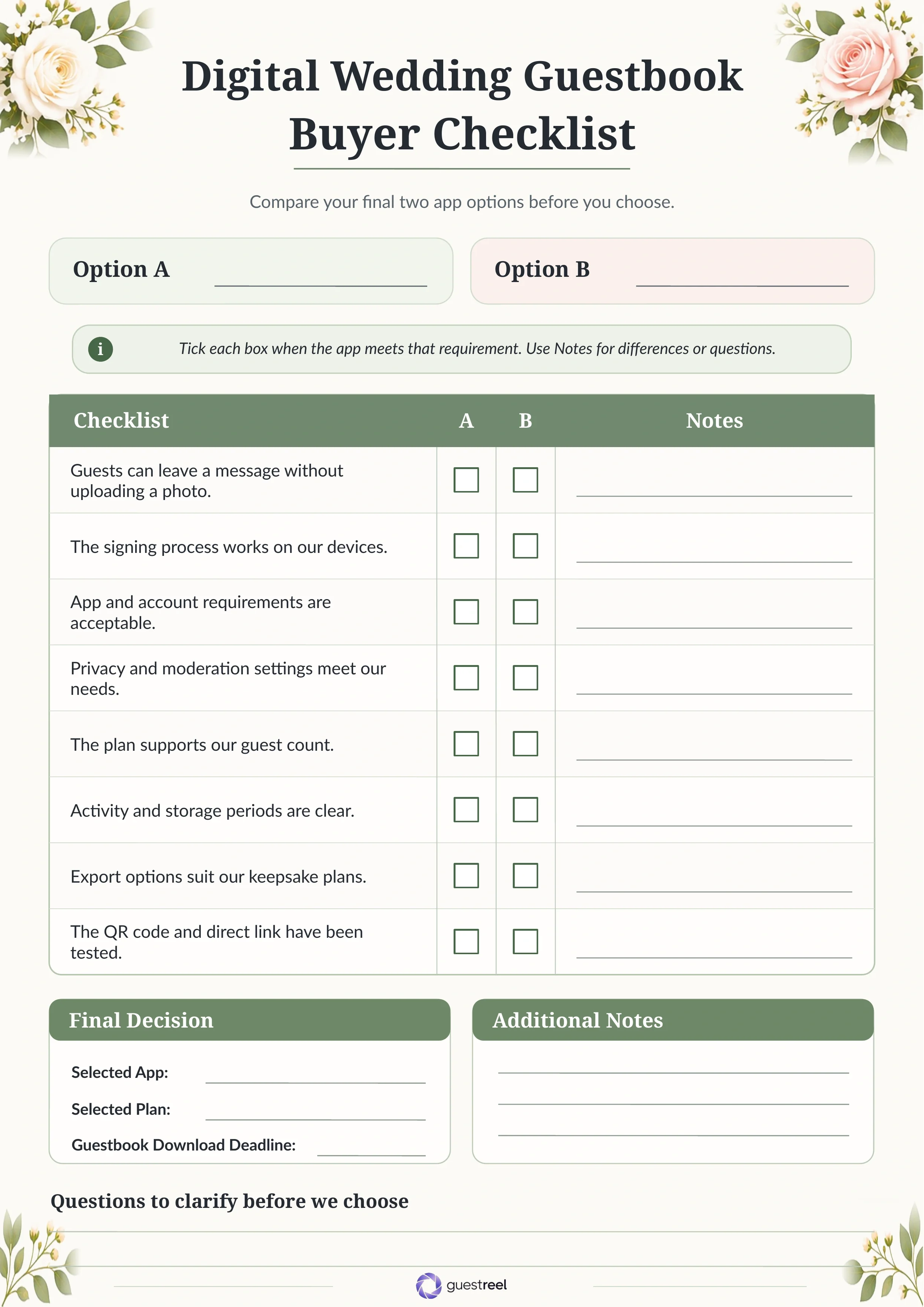
What Should You Check Before Choosing an App?
Before purchasing, compare the experience from both perspectives: the person writing the message and the couple keeping it.
| Question | Why it matters |
|---|---|
| Can guests leave a standalone message? | They shouldn't need a photograph to write a wish |
| Is an app or account required? | Additional steps may affect participation |
| Can messages be private? | Some contributions may be intended only for the couple |
| Can hosts moderate entries? | Controls what appears on a shared guestbook |
| What can you download? | PDF, CSV, text, and online galleries serve different purposes |
| When does access expire? | You need time to collect and preserve contributions |
| Which plan supports your guest count? | A free trial may not cover the actual wedding |
Understand What You Can Keep After the Wedding
Not all exports are interchangeable.
| Format | What you receive | Best for |
|---|---|---|
| Printable PDF | A prepared page layout | Printing a keepsake |
| CSV | Messages organized in spreadsheet rows | Saving and sorting entries |
| Text file | Written messages without a finished design | Creating your own layout |
| ZIP archive | Several downloaded files together | Backing up the collection |
| Online gallery | Messages displayed on a hosted website | Browsing while access remains active |
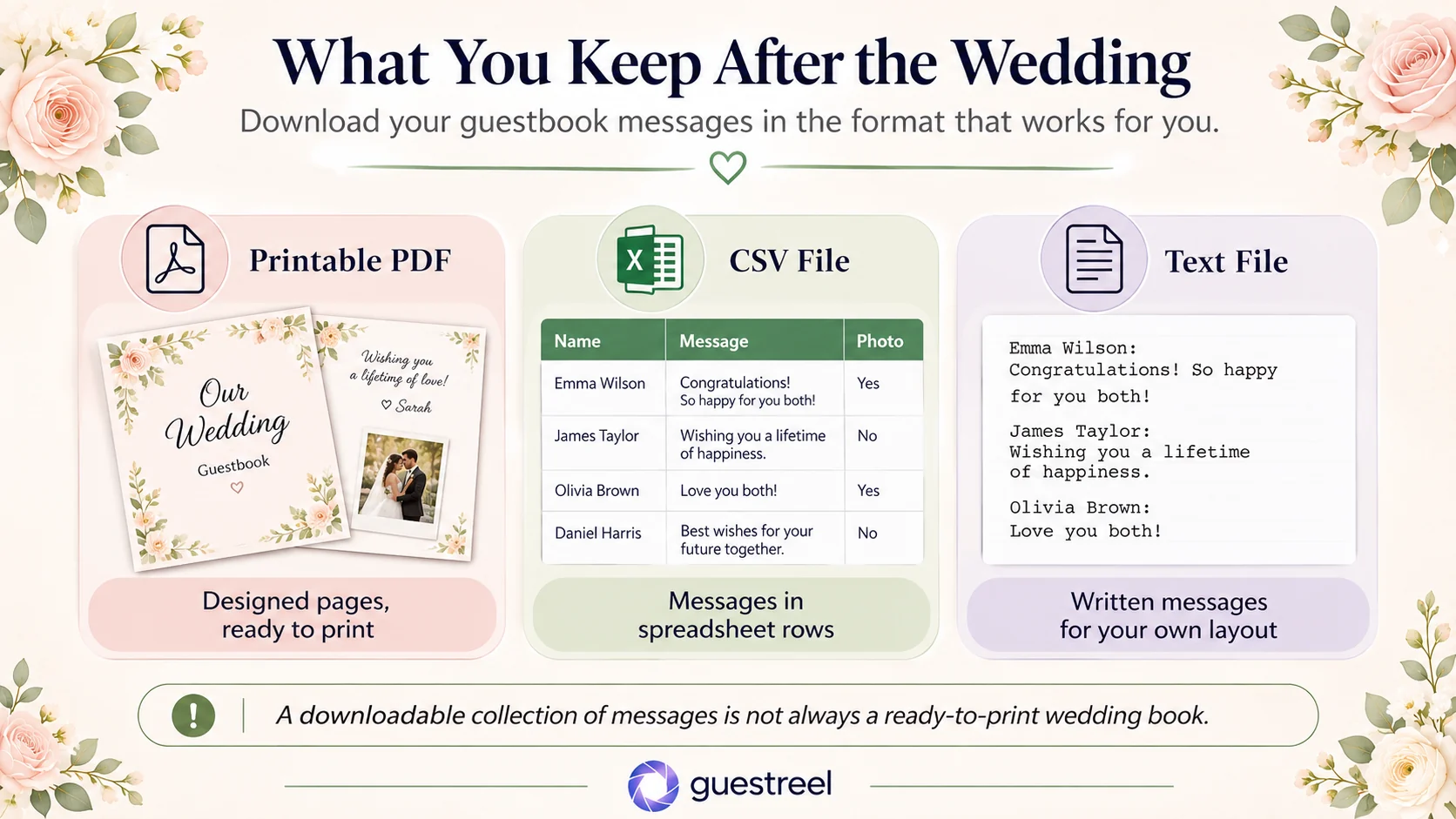
If printing is important, inspect a real sample of the finished export where one is available.
Also distinguish the guestbook's contribution window from its storage period. Some services allow guests to submit messages for only a limited time, even when the collection remains viewable afterward.
For weddings planned many months ahead, confirm whether these periods begin when you create the event or on the event date.
How to Create a Digital Wedding Guestbook
Once you've selected a platform, the setup process should focus on making it easy for guests to find and sign.
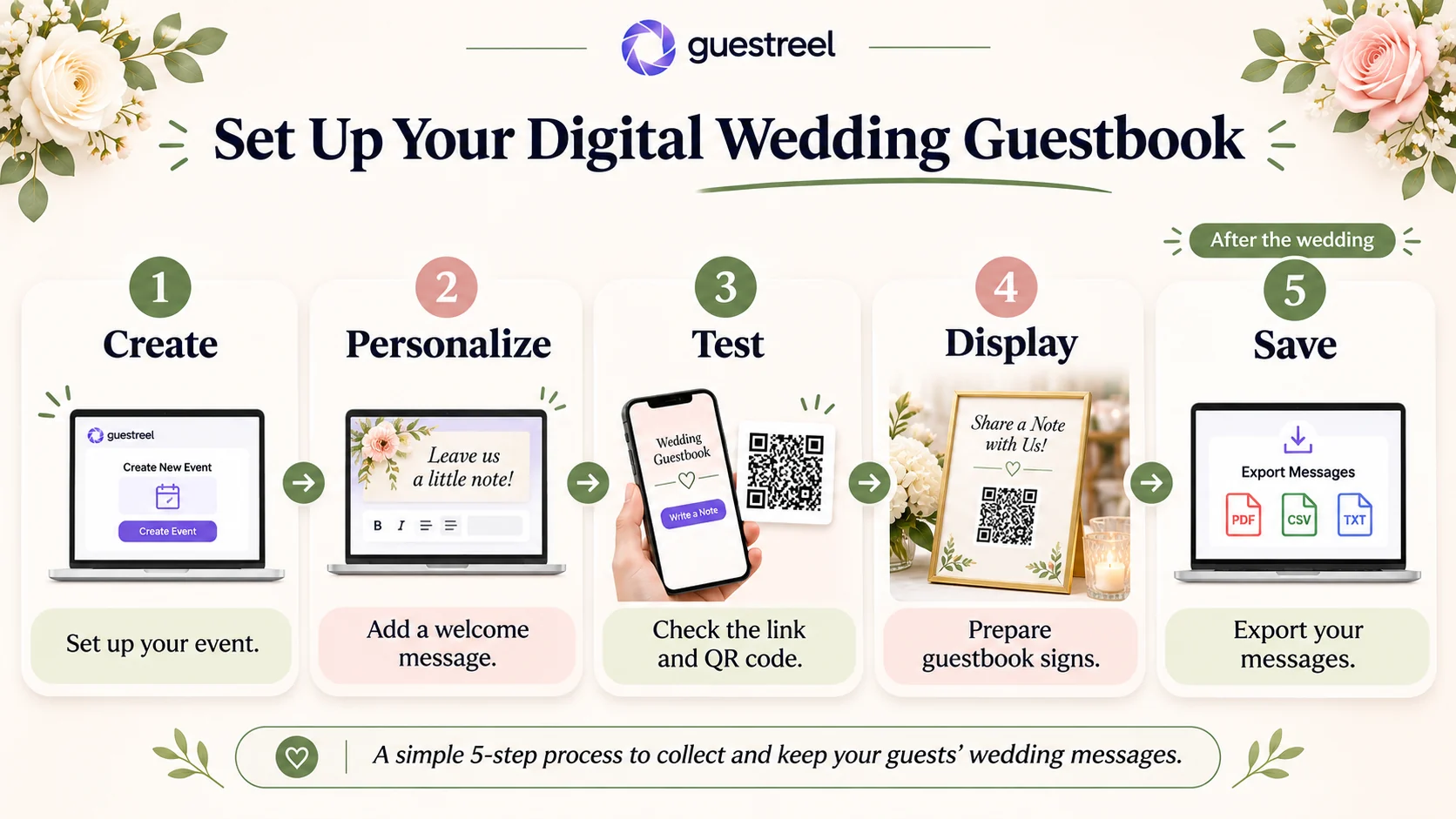
Step 1: Create Your Event
Enter your wedding names, date, and other required information.
Choose any available design options, such as colors, backgrounds, or guestbook styles.
If the platform supports privacy settings, decide whether messages should be visible to other guests or only to you.
Step 2: Add a Welcome Message
Tell guests what you would like them to write.
For example:
"We're so happy you're celebrating with us. Leave a favorite memory, a little marriage advice, or a wish for our future. We'd love to read your message after the wedding."
One clear instruction is usually more useful than several competing prompts.
Step 3: Test the Guest-Signing Experience
Before sharing the link, open the guestbook on a phone while signed out of the host account.
Try leaving a written message without attaching a photo.
Check that the note reaches the correct guestbook and that your chosen privacy settings work.
If you're using a QR code, test the printed code at its intended size. Make sure it opens the guestbook directly or provides a clear way to reach it.
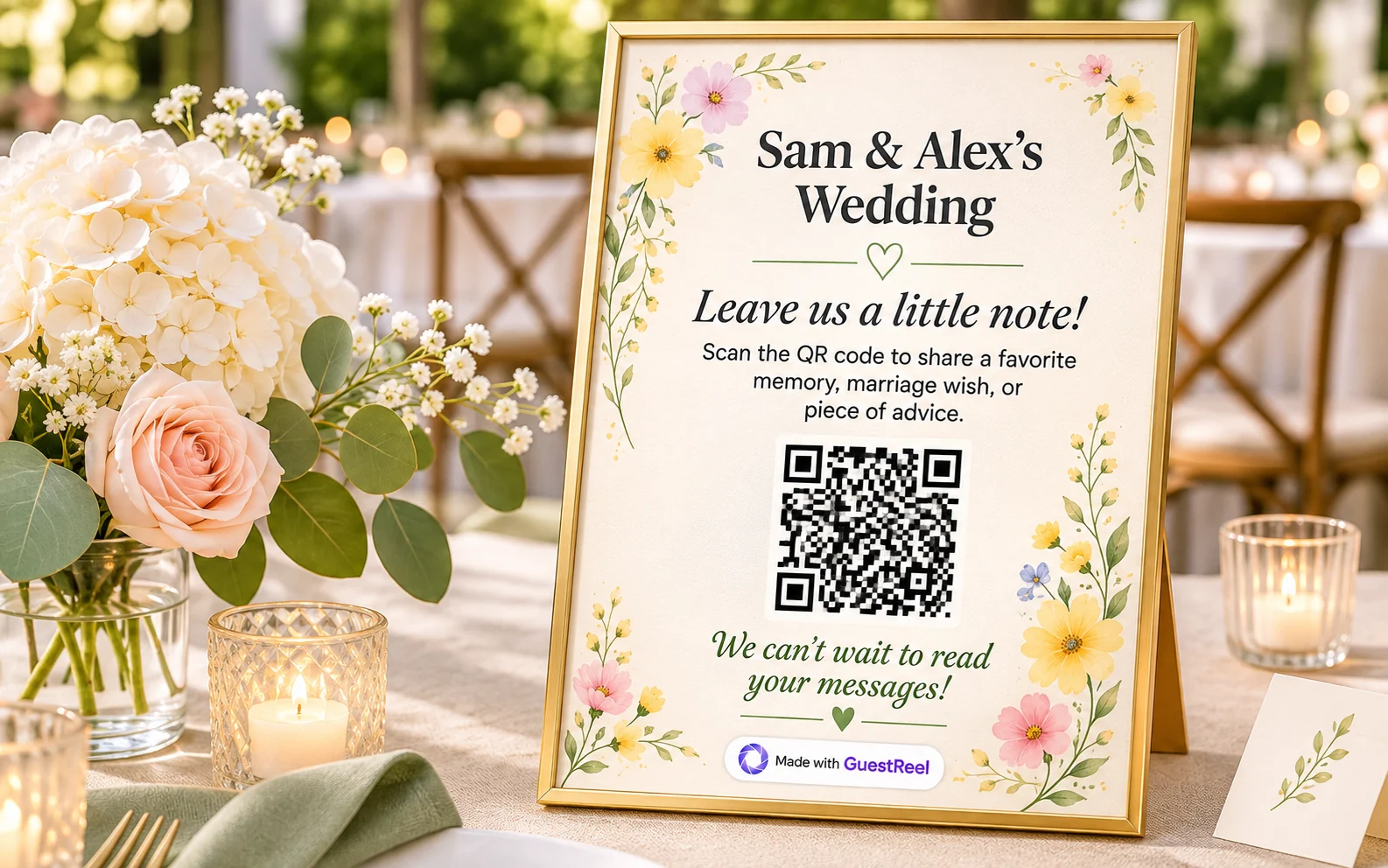
Step 4: Prepare Wedding Guestbook Signage
Display the QR code somewhere guests will naturally notice it.
Useful locations include the reception welcome area, seating-plan display, dining tables, and a dedicated guestbook station.
Keep your sign simple:
Leave Us a Little Note
Scan the QR code to share a favorite memory, marriage wish, or piece of advice.
We can't wait to read your messages!
Include a short direct link as an alternative for guests who cannot scan the code.
Step 5: Save the Finished Guestbook
After the wedding, review the messages and download the available files.
If private notes are included, decide whether they should appear in the printable version.
Keep a backup of your exported guestbook, especially if the platform has a limited retention period.
How to Encourage Guests to Sign Your Wedding Guestbook
Creating the guestbook is only part of the job. Guests also need to notice it and know what to write.
Give them a prompt. Questions such as "What's your favorite memory of us?" or "What advice would you give us for married life?" provide an easy starting point.
Choose the right moment. Reception dinner or a relaxed interval may provide more time for thoughtful messages than a busy transition between activities.
Use one reminder. Your MC or coordinator can briefly mention the guestbook during the reception.
Include absent guests. If your platform allows remote contributions, share the event link with relatives and friends who couldn't attend.
Allow time afterward. If your plan permits it, keep the guestbook active briefly after the wedding so people can contribute when they're home.
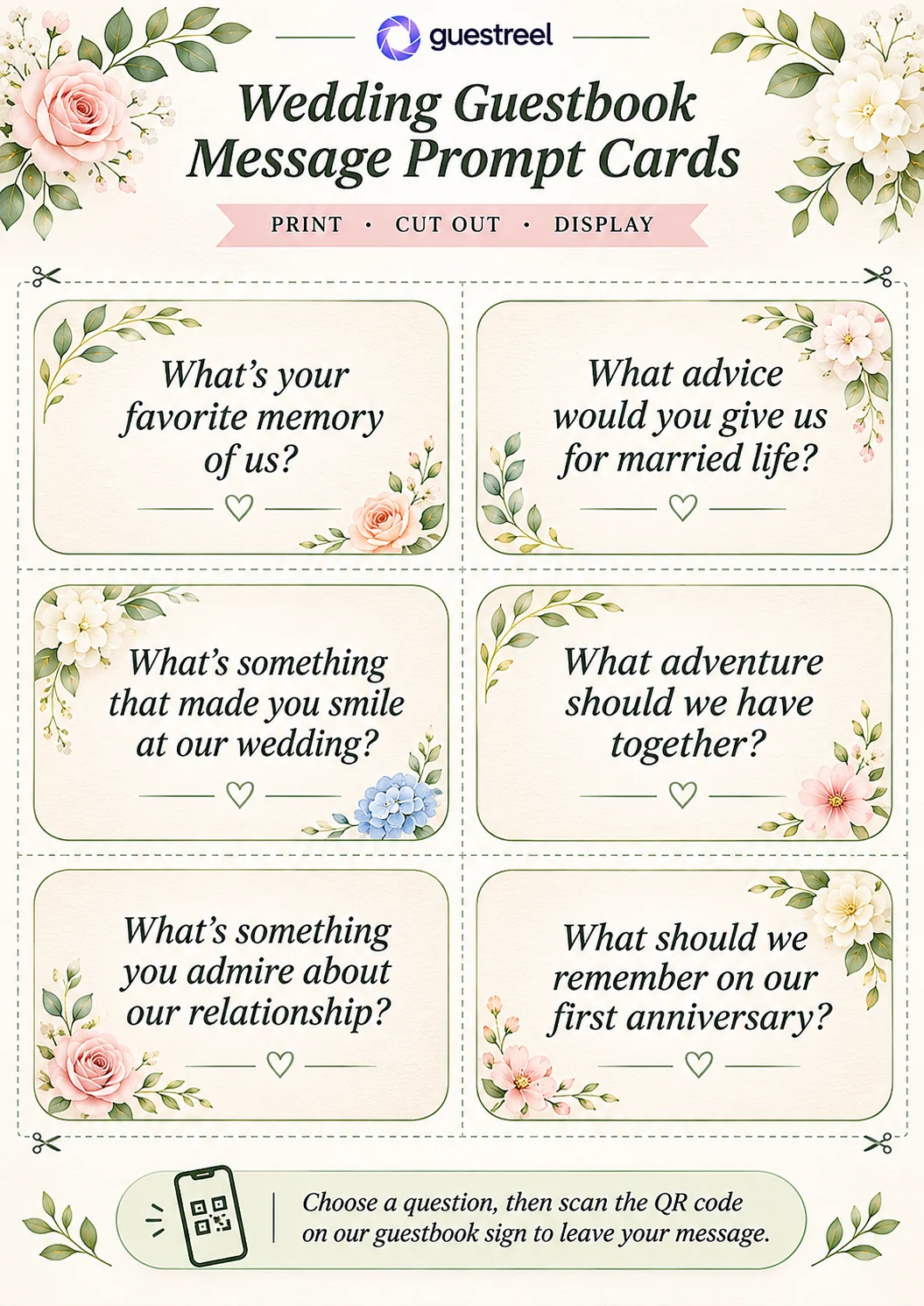
Wedding Guestbook Message Prompts
Here are six prompts you can use:
- What's your favorite memory of us?
- What advice would you give us for married life?
- What's something that made you smile at our wedding?
- What adventure should we have together?
- What's something you admire about our relationship?
- What should we remember on our first anniversary?
For more creative examples and alternatives, see our wedding guest book ideas guide.
Frequently asked questions
What Is the Best Digital Wedding Guestbook App?
The best option depends on your priorities. Guestreel and Guestbook.tv are worth considering for printable keepsakes, GUESTPIX and EventShare for free written messages, Wedibox for writing prompts, Kululu for live displays, and Eventoly for message approval controls.
Are There Free Digital Wedding Guestbook Apps?
Yes. GUESTPIX and EventShare offer free written guestbooks, while Guestbook.tv has a limited free plan. Guestreel and Eventoly offer free trials. Check each plan's guest limits, activity window, and download options.
Do Guests Need to Download an App?
Not always. Guestreel, GUESTPIX, Wedibox, Kululu, EventShare, Guestbook.tv, and Eventoly document browser-based participation. Joy's virtual guestbook currently requires the Joy mobile app and an account.
Can Wedding Guests Sign From Anywhere?
Many platforms let guests contribute through a direct event link while the guestbook is active. This can include relatives who cannot attend the wedding in person.
Can I Print a Digital Wedding Guestbook?
Yes, if the platform supports printable exports. Guestreel and Guestbook.tv document PDF keepsakes. Other services may offer CSV or text exports that require separate formatting.
What Happens If Guests Cannot Scan the QR Code?
Provide a direct link as a backup. If the issue is internet connectivity at the venue, guests may need to contribute later when they have access to a working connection.
The Bottom Line
The best digital wedding guestbook app is the one that makes signing straightforward and preserves the messages in a format you'll want to revisit.
Choose Guestreel or Guestbook.tv when printable keepsakes matter, GUESTPIX or EventShare when a free written guestbook is the priority, Wedibox when you want writing prompts, and Kululu when a live display is part of your reception plans. Eventoly is worth considering for approval controls, while Joy may suit couples already using its wedding website.
Before committing, test the guest experience, compare the plan limits, and check what you can download afterward.
If you're considering personalized written notes with optional photos, you can explore Guestreel's digital guestbook demo to see how the signing experience works before creating your event.
Written by Linda DoWrites Guestreel’s planning guides.